Find a Business, Build Their Website — From Google Listing to Live Site in Minutes
SiteDrop's Lead Finder scans any area, finds businesses without websites, extracts their details from public listings, and pre-fills the builder. One click from lead to finished website.

If you build websites for small businesses — as a freelancer, an agency, or just a side hustle — the hardest part is not building the site. It is finding the client. And then, once you find them, gathering all their business details before you can even start.
SiteDrop's Lead Finder flips that process on its head. Search any area, find businesses that need a website, and build that website in one flow — with their name, address, phone number, services, opening hours, Google rating, and photos already filled in.
No data entry. No back-and-forth emails. No guessing.
How It Works: From Search to Live Website
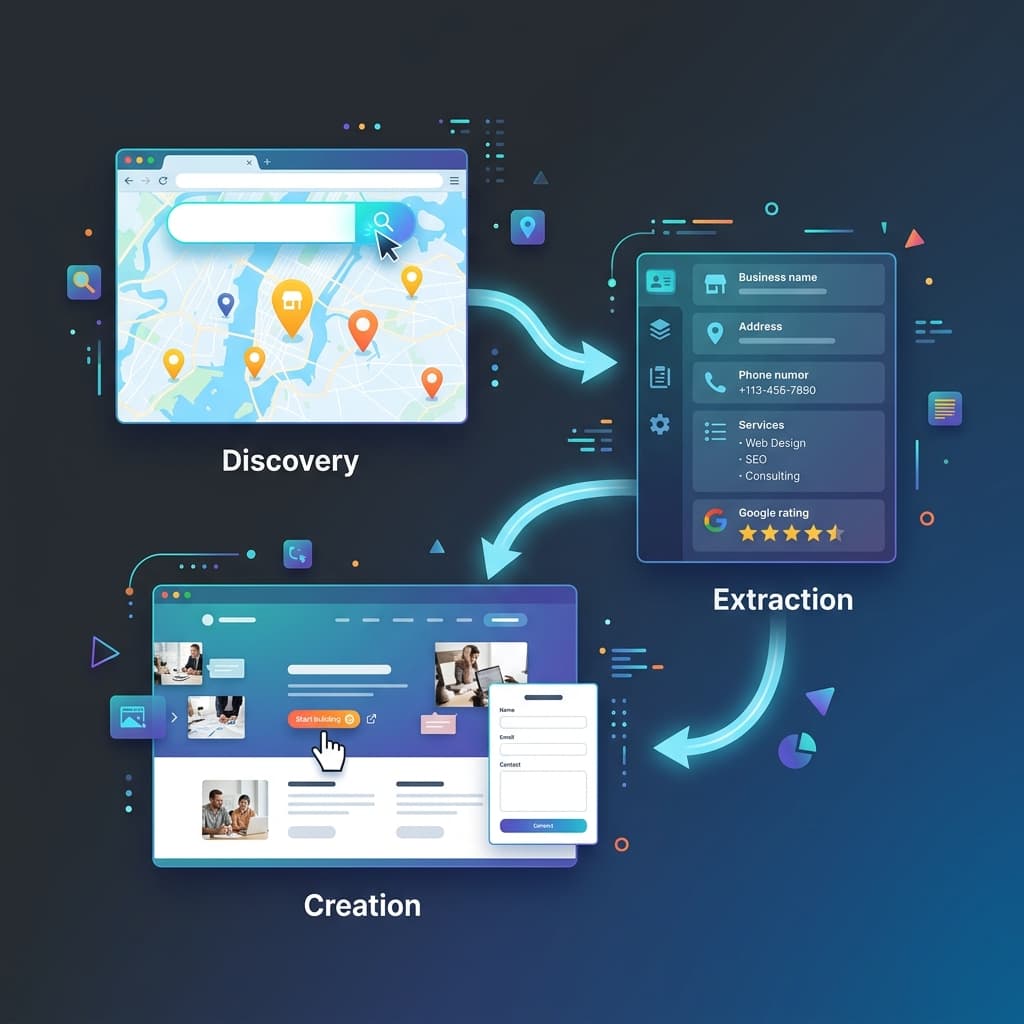
Step 1: Search Any Neighbourhood
Type a location — "Camden London," "Kreuzberg Berlin," "Astoria Queens" — and Lead Finder scans every business listing in the area. It opens each business's website (if they have one) and checks it in real time: is it mobile-friendly? Does it use HTTPS? Is the copyright year current? Is it using Flash or table-based layout?
In seconds, you get a categorised list:
- No website listed — businesses with no web presence at all. These are the easiest pitch.
- Social media only — they have a Facebook page but no real website. Another easy conversation.
- Outdated website — their site exists but looks old, is not mobile-friendly, or has technical problems. A redesign pitch.
- Site unreachable — their listed URL does not respond. Often a dead domain or expired hosting.
Step 2: Open the Dossier
Click any business and Lead Finder shows you everything it found about them — pulled from public listings, not from AI guesswork:
- Business name and category
- Full address and map link
- Phone number
- Opening hours
- Google rating and review count
- Services (extracted from their existing site, if they have one)
- Email addresses and social media profiles
- A summary of what Google says about them
For subscribers, a deep-scan option reads their existing website and pulls out emails, social links, and a services list — everything you need for a targeted outreach message.
Step 3: Hit "Build Their Website"
This is where it gets interesting. Instead of copying facts into a spreadsheet and opening a separate website builder, you click one button and SiteDrop opens the website builder pre-filled with everything it found.
The build screen shows you two panels:
- What we found— a fact sheet of the business: category, address, phone, hours, services, emails, socials, Google rating, and a status line explaining why this business needs a website ("No website listed — this would be their first" or "Their current website looks outdated").
- Ready to build— a pre-assembled prompt describing the business, combining listing data with anything pulled from their existing site. The prompt is fully editable — you can tweak it or just hit "Start building."
The generated prompt includes their real Google rating ("Rated 4.8★ on Google from 127 reviews — feature that proudly"), their actual services, and a contextual pitch line based on their website status.
What Makes This Different
Zero Data Entry
Traditional web design workflow: find a business → email them → schedule a call → extract requirements → type their info into a builder → build the site → hope they like it. That is hours of work before a single pixel exists.
Lead Finder workflow: search an area → click a business → hit build → see a finished website with their real details already in it. Minutes, not hours.
Real Data, Not Placeholders
The website is generated with the business's actual name, actual address, actual phone number, actual services, and actual Google rating. It is not a template with "Your Business Name Here" placeholders — it is a real, working website for that specific business from the first preview.
Show Before You Pitch
Here is the most powerful part of this workflow: you can build the website beforeyou even contact the business owner. Instead of cold-calling and saying "I can build you a website," you send them a link to a website that already exists — with their name, their services, their Google rating, and their contact details on it.
"I built you a website — take a look" is a fundamentally different conversation than "would you like me to build you a website?"
Edit Everything in SiteDrop
Once the site is generated, you edit it directly in the SiteDrop dashboard. Swap in real photos of their business. Adjust the wording. Rearrange sections. Everything happens in the visual editor — no code, no separate tools. When it looks right, publish it with one click.
Who This Is For
Freelance Web Designers
Lead Finder replaces the most time-consuming parts of your workflow: prospecting and data gathering. Search the neighbourhoods you want to serve, find businesses without websites (or with embarrassing ones), and have a finished demo ready before you pick up the phone. Your pitch goes from "I can help" to "I already did — here's your site."
Marketing Agencies
Run Lead Finder across a target area to identify opportunities at scale. The dossier gives your sales team everything they need for outreach: contact details, website audit signals, and a ready-made pitch draft you can copy with one click. When the prospect says yes, the website is already half-built.
Side Hustlers and Entrepreneurs
Want to sell websites to local businesses as a side income? Lead Finder is the entire front-end of that operation. Find businesses that need help, build them a demo site for free, and pitch it. If they want it live on their own domain, you earn from the hosting. The upfront investment is zero — just your time.
The Technical Details
For the curious, here is what happens under the hood when you click "Build their website":
- Listing data(name, category, phone, address, hours) comes from the business's public Google Maps or OpenStreetMap listing. This is verified provider data.
- Website scan — if the business has an existing website, SiteDrop reads it and extracts services, about text, email addresses, social media links, and images. No AI at this stage — deterministic extraction only.
- Google Place Detailsenriches the listing with the business's Google rating and review count.
- Prompt assembly merges all sources into a natural-language description: who the business is, what they do, their proof points (rating/reviews), and a contextual instruction based on why they need a new site.
- The generate request rides the exact same contract as the main SiteDrop wizard — so progress tracking, preview, and publishing all work identically.
The entire handoff survives a sign-in round-trip (stored in localStorage with a 24-hour TTL and consumed once), so even if the user needs to create an account first, they land directly into the pre-filled build screen.
A Real Example
Say you search "Stoke Newington London." Lead Finder returns 20+ businesses. You spot a café with no website listed, a 4.6 Google rating from 89 reviews, and an address on Church Street. You click it, hit "Build their website," and thirty seconds later you are looking at a finished café website with:
- Their real name and address in the header
- "Rated 4.6★ by 89 customers on Google" displayed proudly
- A contact section with their real phone number
- Opening hours pulled from their Google listing
- A working contact form
- A Google Maps embed showing their exact location
You swap in a photo of the actual café from their social media page, tweak the colour scheme to match their signage, and send them the preview link. The whole thing took five minutes.
Try It Now
Lead Finder is free to search — you do not need an account to scan an area and see the results. Click any business to see what we found about them. Building a demo site and getting contact details are available on paid plans.
Find businesses that need a website — and build it for them
Search any neighbourhood, find businesses without a website (or with a bad one), and build a pre-filled demo site in minutes. Real details, real data, real website — before you even make the call.
Open Lead Finder →Comments
No comments yet. Be the first to share your thoughts!