Find Businesses That Need a Website — Lead Finder Tool
Enter any address and find local businesses that don't have a website — or have one so outdated it needs replacing. Pre-sorted by opportunity, audited in real time.
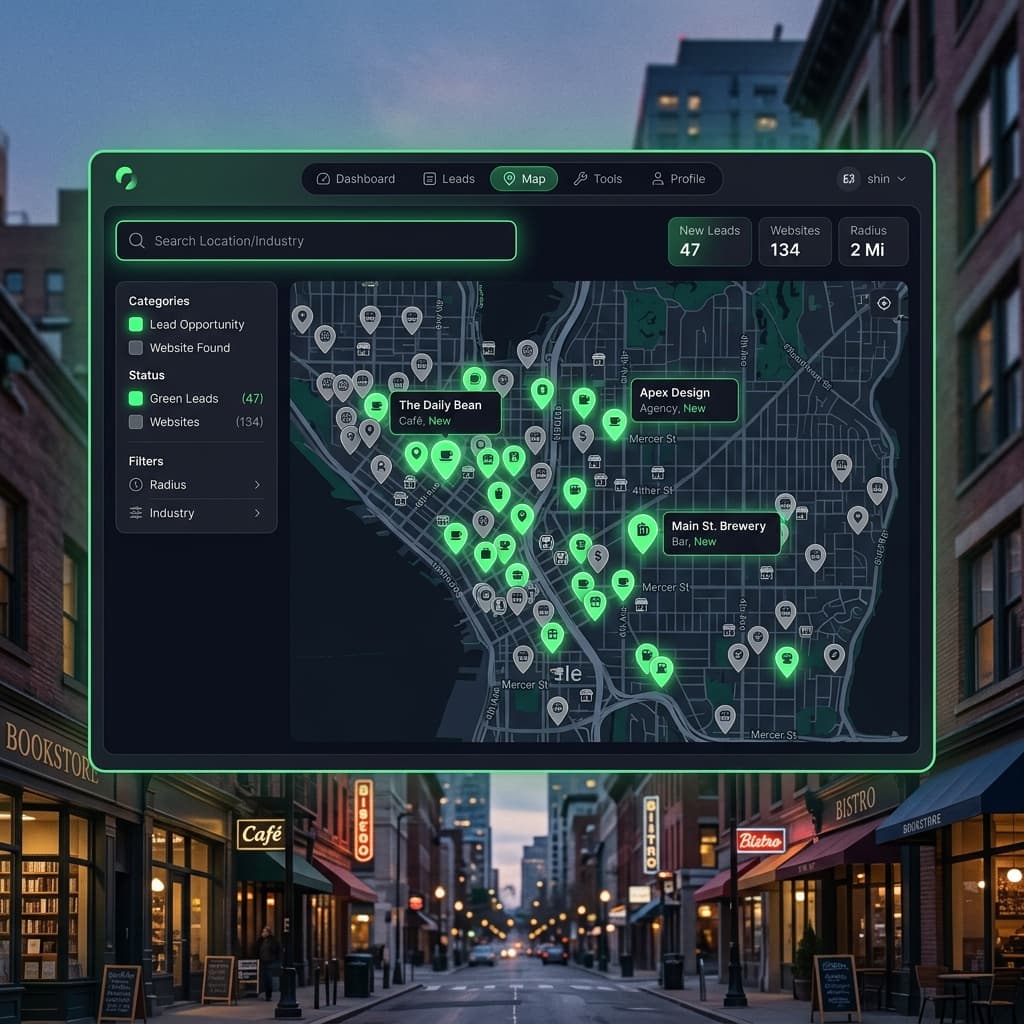
If you build websites for a living — freelance, agency, or side hustle — the hardest part isn't the design. It's finding clients. You know there are businesses near you right now that need a website. You drive past them every day. But manually Googling every shop on the high street, checking if they have a site, figuring out if it's any good — that takes hours. And most of the time, you end up scrolling Google Maps one pin at a time.
SiteDrop's Lead Finder does that entire research process for you. Enter any address, and it finds local businesses that either have no website at all or have a site so outdated it might as well not exist. Free. No account required.
How Lead Finder Works
Lead Finder is a free tool on SiteDrop's website — you don't need to sign up or log in. Here's the process:
- Enter any address. A street, a postcode, a town name. Anywhere in the world.
- Lead Finder scans nearby businesses. The tool queries real business databases and maps to find businesses within the area — restaurants, shops, salons, tradespeople, studios, offices, everything.
- Each business is audited. For every business that claims to have a website, Lead Finder visits the URL and runs a real-time audit. Does the site load? Is it mobile-friendly? Does it look modern or like it was built in 2008? Does it have proper HTTPS? Is it just a Facebook page?
- Results are sorted by opportunity. The best leads appear first: businesses with no website at all, then businesses with outdated websites (high-scoring opportunities), then unknowns, and finally businesses with modern sites (low opportunity).
What You See for Each Lead
Each business in the results shows you everything you need to make your pitch:
- Business name and category (restaurant, hair salon, dental practice, etc.)
- Address — so you can walk in and introduce yourself
- Website status— "No website," "Outdated," or "Modern"
- Audit details(for existing sites) — what's wrong with their current site: no HTTPS, not mobile-friendly, outdated design patterns, broken pages, social-media-only presence
- Phone number — when available from the listing
A business marked "No website" is a warm lead — they literally do not have a web presence. A business marked "Outdated" is a slightly different conversation: "I noticed your website hasn't been updated in a while — I can help you modernise it."
Why This Matters for Web Designers and Agencies
Finding clients is the silent time sink of every web design business. You can spend three hours driving around a neighbourhood, Googling every storefront, checking each business for a website, and evaluating whether their current site is salvageable. Or you can type an address into Lead Finder and get 20 pre-qualified leads in 30 seconds.
Here's the math that matters:
- Manual prospecting: ~3 hours per neighbourhood, ~5–10 viable leads
- Lead Finder: ~30 seconds per neighbourhood, ~10–25 pre-sorted leads
- Time saved per session: 2+ hours
That's 2 hours you can spend on actual design work, or on walking into those businesses and closing deals.
Built for Honesty — Not Fabrication
Lead Finder doesn't guess. It doesn't use an LLM to hallucinate business information. Every lead comes from real business databases. Every website audit is a real-time check — the tool actually visits the URL, measures the response, and analyses the HTML. There's no AI generating fake assessments.
Businesses that the tool can't audit (site behind a login, timeout, or bot-wall) are marked "Unknown" — never given a false positive score. The tool would rather say "I couldn't check" than fabricate a result.
Social-Only Businesses Are Leads Too
A growing number of small businesses use a Facebook page or Instagram account as their entire web presence. Lead Finder identifies these as "No website" — because a social media page is not a website. You don't control it, Google doesn't index it properly, and it doesn't show up when someone searches "plumber near me."
These are some of the easiest conversations to have: "You have a great Instagram presence — but when someone Googles your business name, nothing comes up. Let me fix that."
Pair It With SiteDrop to Close Faster
Lead Finder is a standalone free tool — you don't need to use SiteDrop to benefit from it. But if you do use SiteDrop, the workflow becomes very tight:
- Find a business with no website using Lead Finder
- Walk in (or call) and say: "I noticed you don't have a website — I can build you one in five minutes, right now, for free. Want to see?"
- Open SiteDrop on your phone, answer the questions about their business, and generate a site with Forge while they watch
- Show them the live preview on your phone: "This is your website. Right now. With your business name, your details, your services."
- Close the deal: connect their domain, make final edits, hand it over
That "build it in front of them" moment is incredibly powerful. You're not pitching a concept — you're showing them a finished product. The conversion rate on a live demo is dramatically higher than a proposal email.
Completely Free — No Strings
Lead Finder is free. No account required. No credit card. No limit on how many addresses you search. We built it because the best way to grow SiteDrop is to help the people who build websites for others — and the first step is helping them find clients.
Type any address. Find businesses that need a website. Start a conversation.
Try Lead Finder
Enter any address and find local businesses that need a website. Pre-sorted by opportunity. Real-time website audits.
Find Leads Near You →Comments
No comments yet. Be the first to share your thoughts!