AI-Generated Images That Actually Match Your Website's Design
No more generic stock photos or broken image links. SiteDrop now generates custom AI images matched to your site's colours, industry, and vibe — and lets you swap in your own photos with one click.
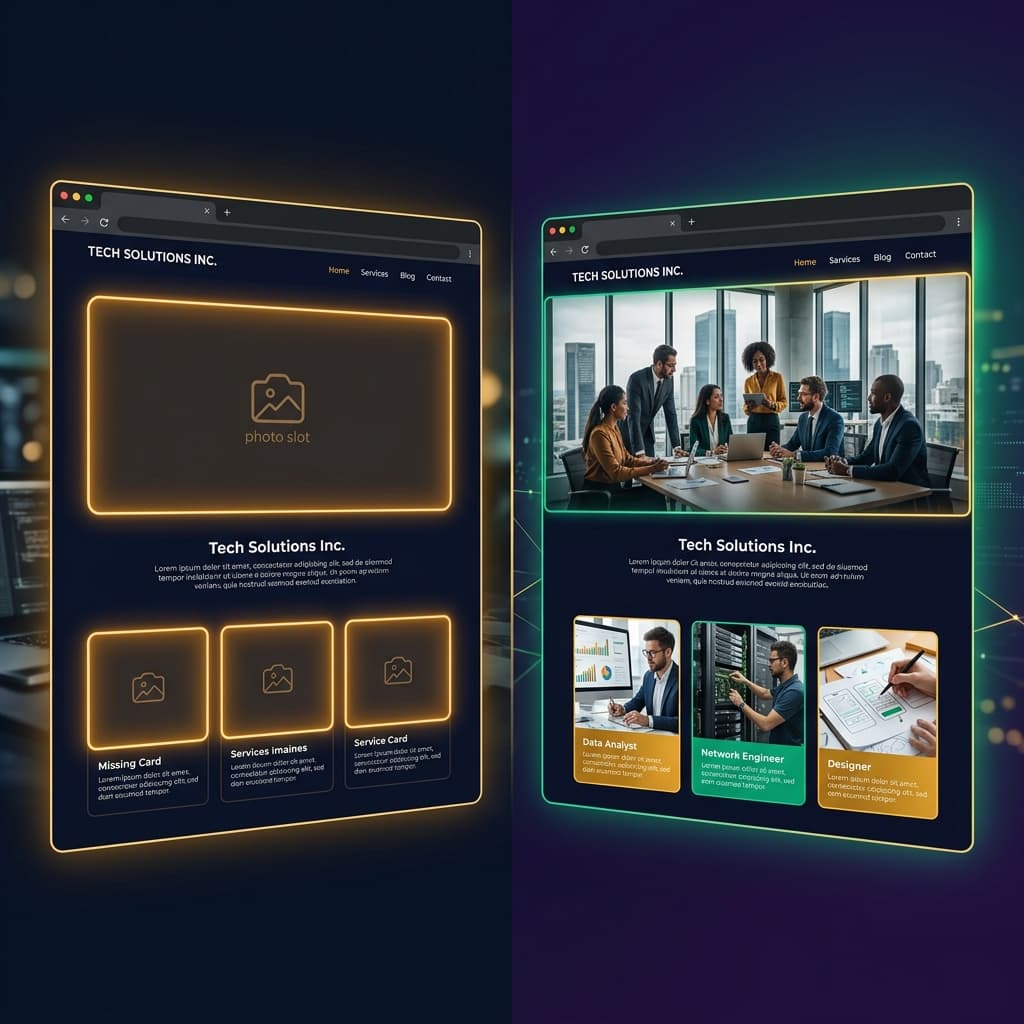
There is a dirty secret in AI website building: the websites look great until you notice the images. Generic stock photos. Mismatched colour tones. Placeholder boxes where photos should be. The design is beautiful but the imagery feels like an afterthought — because it was.
We have just solved this. SiteDrop now generates custom AI images that match your specific website — the colours, the industry, the vibe. Every image is created for your site, not pulled from a stock library. And when you are ready, you can swap any of them for your own photos with a single click.
The Image Problem Every AI Website Builder Has
When you use ChatGPT, Claude, or Gemini to build a website, the AI generates the layout and the copy. But it cannot generate images. So you get one of three outcomes:
- No images at all. The AI leaves coloured boxes or gradient placeholders where photos should be. The site feels unfinished.
- Unsplash/stock links.The AI includes URLs to stock photo services. The images are generic — the same cafe photo you have seen on a thousand websites. They rarely match the site's colour scheme.
- Broken links. The AI invents image URLs that do not exist. The page loads with broken image icons. You have to fix each one manually.
All three outcomes mean the same thing: after the AI generates your beautiful website, you still have hours of image work ahead of you. Finding the right photos, cropping them, matching the colour tone, uploading them — it is the tedious part that kills the magic of "I just built a website in five minutes."
How SiteDrop's Image System Works
SiteDrop's new SiteForge engine treats images as a first-class design decision, not an afterthought. Here is how:
1. Every Image Gets an Art Direction Brief
When SiteForge generates your website, every image slot comes with a detailed prompt — not just "photo of a restaurant" but a full art direction brief that includes the subject, the mood, the lighting style, and the colour palette of your specific site. A moody barbershop site gets dark, editorial-style photos. A bright yoga studio gets warm, natural-light imagery.
2. A Stable Slot-Based Address System
Every image surface on your website gets a stable address — a slot ID that uniquely identifies where that image appears (hero background, feature card 3, testimonial avatar 2). This means:
- You can replace any specific image without touching any other part of the site.
- AI-generated images are matched to the exact slot they fill — right aspect ratio, right role, right visual weight.
- Swapping an image later does not break the layout or require regenerating the site.
3. Site-Wide Image Art Direction
Beyond individual image prompts, the AI sets a site-wide image style— the overall photographic look, lighting approach, and colour palette for all images. This is appended to every generated image prompt, ensuring visual consistency across the entire site. A sleek, dark-mode portfolio gets cinematic, low-key images. A cheerful children's nursery gets bright, high-key photos with warm tones.
4. Negative Guards Built In
Every AI image prompt automatically includes safeguards: no text, no words, no watermarks, no logos. This is enforced by the engine — not left to the AI model's discretion. The result: clean, professional photos that actually look like photographs, not AI-generated content.
The Photo Studio: Your Images, Your Way
AI-generated images get your site looking complete from day one. But the real power comes when you want to use your own photos. SiteDrop gives you a Photo Studio — a visual interface that shows every image slot on your website and lets you:
- See every image surface — hero backgrounds, feature cards, team portraits, gallery thumbnails — mapped visually to your site.
- Upload your own photos — drag a photo onto any slot and it replaces the AI image instantly. The layout, spacing, and cropping are handled automatically.
- Keep the AI images you like — not every image needs to be replaced. If the AI generated a perfect hero background for your brand colours, keep it.
- Mix and match — use your own product photos for the gallery, keep the AI-generated lifestyle images in the feature sections, and upload your team headshots to the about section.
Why This Matters for Real Businesses
Images are not decoration. For a local business, the hero image is the first impression. For a restaurant, the food photos drive orders. For a tradesperson, before-and-after shots build trust. Getting images right is not optional — it is the difference between a website that converts and one that gets closed.
SiteDrop's approach solves the two biggest image pain points:
- Day one: Your site goes live with professional, colour-matched images immediately. No placeholder boxes, no broken links, no generic stock photos.
- Day two: When you have your own professional photos (or even good phone snaps), you swap them in with a click. No regenerating the site, no re-uploading HTML, no code.
The Technical Difference
Most AI website tools treat images as strings — a URL the AI drops into an HTML src attribute. If the URL breaks, the image breaks. If you want a different size, you edit the HTML. If you want a different image, you edit the HTML again.
SiteDrop treats images as addressable design surfaces. Each slot has a role (hero, feature, avatar), an aspect ratio, a prompt, and a source — all managed by the engine, not by the raw markup. The HTML is a compiled output, not the source of truth. Change the image source in the spec, recompile, and the HTML updates — perfectly cropped, properly optimised, layout-safe.
The Bottom Line
Your AI website should look finished the moment it is generated — including the images. And when you want to personalise it with your own photos, that should be a 30-second task, not an hour of HTML editing.
SiteDrop now does both. Custom AI images that match your brand from day one, and a visual image studio that makes swapping them effortless.
Get a website with images that actually match
Generate a professional website with AI-matched imagery — then swap in your own photos whenever you are ready. No stock photos, no broken links, no editing HTML.
Get Started Free →Comments
No comments yet. Be the first to share your thoughts!